In Depth Guide to Comparing Capacity Planning Tools
In Depth Guide to Comparing Capacity Planning Tools - Learn about capacity planning tool
In Depth Guide to Comparing Capacity Planning Tools
Why Choosing the Right Capacity Planning Tool Can Make or Break Your Project
A capacity planning tool is software that helps teams track workload, forecast availability, and match the right people to the right tasks — before projects go off the rails.
Quick answer: What does a capacity planning tool do?
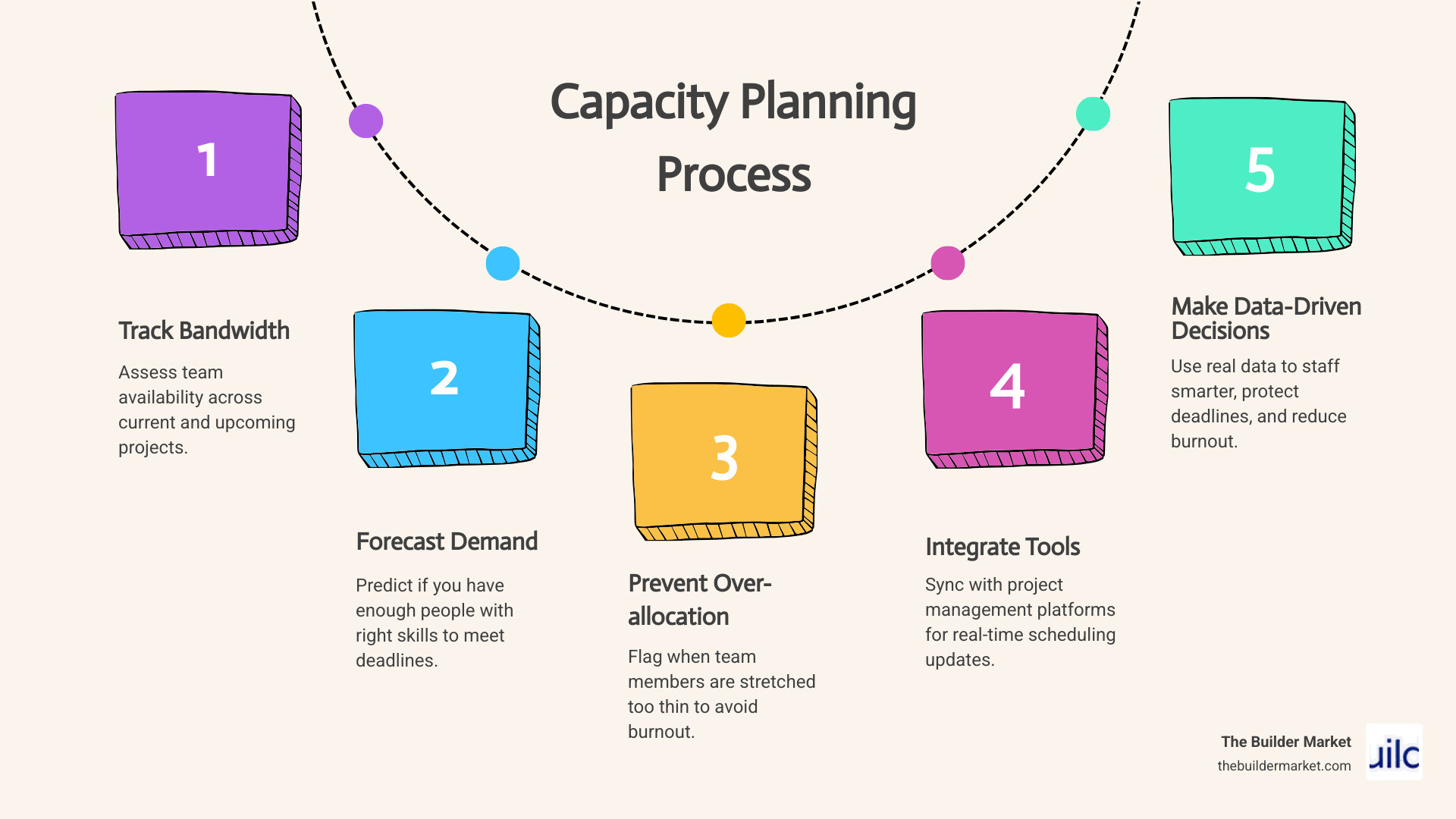
- Tracks how much bandwidth your team has available across current and upcoming projects
- Forecasts whether you have enough people with the right skills to meet deadlines
- Prevents over-allocation by flagging when team members are stretched too thin
- Integrates with project management platforms to keep scheduling and execution in sync
- Helps managers make smarter staffing decisions using real data instead of gut feel
If you manage construction, renovation, or home improvement projects, getting this right matters more than most people realize. According to a 2025 report from Runn, nine in ten leaders say capacity planning is critical to organizational success — yet only two-thirds actually perform regular capacity forecasting. That gap is where deadlines slip, budgets blow up, and good teams burn out.
A 2025 Robert Half survey found that 36% of employees already feel burned out, and a third say things are getting worse. Without a clear view of who is doing what and how much runway they actually have, project managers are essentially flying blind — agreeing to timelines that look reasonable on paper but collapse the moment reality sets in.
The good news is that the right tool changes all of that. Whether you are running a small remodeling crew or coordinating dozens of contractors across multiple job sites, capacity planning software gives you the visibility to plan with confidence, say yes to the right projects, and protect your team from being stretched past their limits.
This guide breaks down the key features to look for, compares different types of tools, and helps you find the right fit for your team's needs.
Simple capacity planning tool glossary:
- Gantt chart application
- Project management tools
- Contractor scheduling software
Understanding the Core Differences in Resource Allocation Software
When we step into resource management, we often encounter a lot of overlapping terminology. Words like "capacity planning," "resource planning," and "capacity management" are frequently tossed around as if they mean the exact same thing. However, using them interchangeably can lead to confusion when you are searching for the perfect software for your business.
To build a solid foundation, we need to look at how these terms operate across different organizational levels:
- Strategic Planning (Long-Term): This is the high-level view. It looks six to twelve months (or more) into the future. It answers big-picture questions: Do we have the workforce to take on double the projects next quarter? Should we hire more specialized engineers, or is our current crew sufficient?
- Tactical Planning (Medium-Term): This bridges the gap between the future and the present, usually looking one to three months ahead. It focuses on allocating specific teams or departments to upcoming projects and identifying potential bottlenecks before they cause delays.
- Operational Planning (Short-Term): This is the daily or weekly grind. It deals with immediate scheduling, managing daily tasks, and handling sudden changes, like an employee calling in sick or a material shipment arriving late.
Understanding these levels helps us see exactly where different tools fit into our workflows.
Understanding the Core Functions of a Capacity Planning Tool
At its heart, a capacity planning tool is designed to answer one crucial question: Do we actually have the bandwidth to do this work?
To answer this, the software relies on several core functions:
- Bandwidth Tracking: It calculates the total working hours available for your team, taking into account weekends, regional holidays, and planned time off.
- Availability Forecasting: By comparing your team's total capacity against the demands of active and upcoming projects, the tool projects future availability. This helps you see exactly when you will have the breathing room to take on new clients.
- Skills Inventory: A modern capacity planner lets you group team members by their unique skill sets, certifications, or roles. If a project requires a licensed structural engineer or a master carpenter, you can instantly see who fits the bill and whether they are available.
- Project Management Integration: It connects directly with your daily task management systems. This ensures that when a task is delayed or extended, your capacity forecast updates automatically, keeping your plans grounded in reality.
Capacity Planning vs. Resource Planning: Key Distinctions
While they sound similar, capacity planning and resource planning focus on different aspects of project management.
Capacity planning is primarily concerned with the human supply—the skills, energy, and working hours of your people. It is a long-term forecasting process that matches future workload demand with human availability. It helps you protect your team's morale by preventing overallocation and identifying skills shortages before they turn into emergencies.
Resource planning, on the other hand, is a short-term allocation process. It looks at how you distribute both human and non-human assets (such as specialized machinery, vehicles, software licenses, and project budgets) to complete specific, active tasks.
While resource planning tells you how to use what you have today, capacity planning tells you what you will need to succeed tomorrow.
Key Features to Look For in a Modern Capacity Planning Tool
Choosing software can feel overwhelming when every platform claims to do it all. To cut through the noise, we recommend focusing on features that make your life easier and your scheduling more predictable.
How an AI-Driven Capacity Planning Tool Prevents Team Burnout
The most valuable asset in any business is its people. When we skip capacity planning, we do not escape our constraints—we simply collide with them at full speed, resulting in exhausted teams and missed deadlines.
An AI-driven capacity planning tool helps you protect your team by using:
- Predictive Analytics: By analyzing historical performance data, the software creates a realistic baseline of how long tasks actually take, rather than relying on optimistic "best-case scenario" estimates.
- Utilization Guardrails: You can set minimum and maximum utilization thresholds for each team member. If an employee's workload exceeds 80% of their total capacity, the system flags them in red, warning you of potential burnout before it happens.
- Attrition Assumptions: Advanced tools can even factor in historical attrition rates and average hiring times, helping you plan your pipeline around realistic staffing levels.
- Workload Balancing: Visual heatmaps allow you to easily see who is overloaded and who has extra space, enabling you to balance workloads with a simple drag-and-drop interface.
Essential Integrations for Streamlining Workflows
A capacity planner shouldn't exist on an island. To keep your data accurate without requiring hours of manual entry, look for tools that offer seamless integrations:
- Project Management Software: Connecting with platforms like Jira or Asana ensures that task updates instantly reflect in your team's overall bandwidth.
- Digital Calendars: Integrating with tools like Google Calendar or Outlook allows the software to pull in approved leaves and vacations automatically, preventing you from scheduling work for someone who is out of the office.
- Time Tracking: Linking planned capacity with actual logged hours helps you compare your estimates against reality, improving the accuracy of your future forecasts.
- API Access: For custom workflows, having robust API access allows you to connect your capacity data with internal databases or custom reporting tools.
Comparing Different Types of Resource Management Software
Not all resource management tools are built the same way. Depending on the size of your organization and the complexity of your projects, you might find yourself choosing between three main categories of software:
| Feature/Capability | Spreadsheet-Based Tools | Dedicated Resource Scheduling Software | AI-Powered Predictive Tools |
|---|---|---|---|
| Setup Complexity | Very Low | Moderate | Moderate to High |
| Real-Time Updates | Manual | Automatic (Task-level) | Automatic (Predictive) |
| Burnout Prevention | None (Requires manual checking) | Visual Heatmaps & Guardrails | Proactive Alerts & AI Balancing |
| Forecasting Accuracy | Low (Prone to human error) | Medium (Based on manual inputs) | High (Based on historical data) |
| Best Suited For | Solo contractors & tiny teams | Mid-sized agencies & growing crews | Enterprise teams & multi-project firms |
The Limitations of Spreadsheets
We have all been there—starting out with a custom-built spreadsheet to track who is working on what. While spreadsheets are incredibly flexible and virtually free, they quickly become a liability as your team grows.
They require constant manual updates, are prone to accidental formula breaks, and offer zero real-time visibility. When you are managing multiple active projects, relying on spreadsheets often leads to double-booking staff and missing critical schedule clashes.
Dedicated Resource Scheduling
Dedicated resource scheduling software moves you away from static grids and into dynamic visual timelines. These tools are built specifically to handle team schedules, showing you exactly who is assigned to which project. They make it easy to manage vacations, track billable versus non-billable hours, and resolve scheduling conflicts on the fly.
AI-Powered Predictive Modeling
For complex operations, AI-powered predictive modeling tools represent the cutting edge. Instead of just showing you current assignments, these platforms use machine learning to simulate future scenarios.
They can run "what-if" models to show you the impact of taking on a new project, automatically suggest the best team configurations based on historical performance, and even predict when a project is likely to fall behind schedule.
Infrastructure Capacity Planning
It is worth noting that some capacity planning tools are designed specifically for IT and cloud infrastructure rather than human workforces. These systems monitor server loads, storage limits, and cloud compute resources to prevent website outages and optimize software costs.
While highly valuable for tech companies, if your main goal is managing a physical crew or a team of creative professionals, you will want to focus on workforce-oriented resource management software.

Frequently Asked Questions About Resource Allocation
Implementing a new way of managing your team's time can raise a lot of questions. Let's address some of the most common challenges and queries that project managers face when setting up a capacity planning tool.

What is the difference between capacity planning and capacity management?
While they sound identical, they serve different areas of business operations:
- Capacity Planning: This is a forward-looking, human-centric process. It focuses on aligning your workforce's skills, energy, and total available hours with your upcoming project pipeline to ensure you have the staff required to deliver work on time.
- Capacity Management: Historically rooted in IT infrastructure and service delivery, this process focuses on optimizing physical or digital resources (like server bandwidth, cloud storage, or manufacturing machinery) to meet real-time workload demands efficiently.
How do these tools integrate with existing project management software?
Most modern capacity planning tools are designed to work hand-in-hand with your existing project management stack. They achieve this through:
- Two-Way Sync: Updates made in your capacity planner automatically reflect in your project management tool, and vice versa.
- Drag-and-Drop Scheduling: You can easily drag tasks directly from your project backlog onto a visual resource timeline to assign them.
- Task Dependencies: If a foundational task is delayed, the software automatically shifts all dependent tasks down the schedule, instantly recalculating your team's future availability.
How does capacity planning prevent team burnout and improve deadlines?
When teams are aligned on the actual end goal of a project, they are 4.9 times more likely to hit key deadlines. Capacity planning makes this alignment possible by providing a clear, honest view of what your team can realistically achieve.
Instead of guessing at timelines, you can set realistic deadlines based on actual availability. By identifying skills shortages early, you can proactively hire support or adjust project scopes, keeping team morale high and preventing the overallocation that leads to high employee turnover.
Conclusion
At the end of the day, successful project delivery isn't about pushing your team to their absolute limits—it is about managing their time, energy, and skills with precision. Using a dedicated capacity planning tool allows you to stop guessing about your team's bandwidth and start planning with absolute confidence.
If you are a homeowner preparing for a major renovation, or a professional looking to streamline your next build, having the right experts on your side makes all the difference. At The Builder Market, we make it simple to connect with vetted professionals who understand how to plan, manage, and execute complex residential construction projects seamlessly.
Ready to bring your next vision to life? Find vetted architects and engineers for your next project through our AI-powered online marketplace today, and experience a smarter way to build.
Need Help?
Contact us today to discuss your needs. Our team is ready to help.
About the Author
The Builder Market
More Articles
View All PostsRelated Articles
Ready to grow with The Builder Market?
Explore listings, AI growth, sites, and lead options—or talk to our team about what fits your business.

